Frequently asked questions
-
Why is this change happening?
This initiative will enhance security and modernize the university’s infrastructure to better support our community in the digital space. It also represents another step toward moving our community to the cloud, helping reduce security risks associated with outdated systems.
-
What happens if I'm not available during my departments/faculties transition time?
We will reach out to any missed staff or faculty in the fall and provide you with a list of dates, when you can complete the transition.
-
Will there be any other changes to my device?
Your computer will function the same as before, with no data loss. There will be no changes to your files, settings or display.
-
What if I don't have an institutional laptop?
If you don't have an institutional device, you will not need to complete the transition yourself. Your account will be automatically transitioned on the same day as your department. Following the transition, you will need to begin logging in with the new login format included above.
Please be mindful of your department/faculties transition date as after your department's transition, you will need to start using the new login format below.
Current login format: oncampus\Banner ID
New login format: ontariotechu\Banner ID
-
What happens if the transition doesn't work on my device?
If you don't receive a reboot prompt on the day of your scheduled migration; the transition wasn't successful.
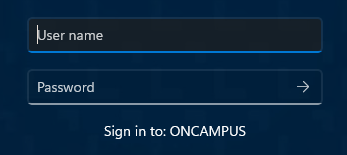
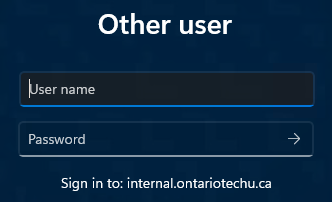
Another way to tell is by looking at your computer's login screen.
Not migrated:
Migrated:
If this happens, please contact ADMigration@ontariotechu.ca.
-
What happens if I receive a Password is incorrect or Account is being disabled message, on the sign-in page?
If this happens, please use the new login format to sign-in.
-
What do I do if I have multiple devices?
If you have multiple devices, please inform your departmental lead prior to the transition. On the day of you scheduled transition, you will need to bring all devices in to be transitioned.
For any specific questions, please contact ADMigration@ontariotechu.ca.
-
What do I do if my preferred name is incorrect?
As part of the transition, all accounts will be updated to reflect the latest Banner data for all users, overriding any existing customizations not completed through the proper Banner name change request form.
If you would like to change your name or customization, please fill our the name name change form or reach out to the Service Desk.
-
What happens if I am also a DC student or employee?
If you are a Durham College student or a shared employee, you will still use your oncampus\Banner ID to login to their systems.
Note: Going forward, when you change the password attached to one account, it will not longer work for both.
If you have any questions, please contact us at ADMigration@ontariotechu.ca. We’re here to help make the transition as smooth as possible.